

Software systems for manufacturing companies
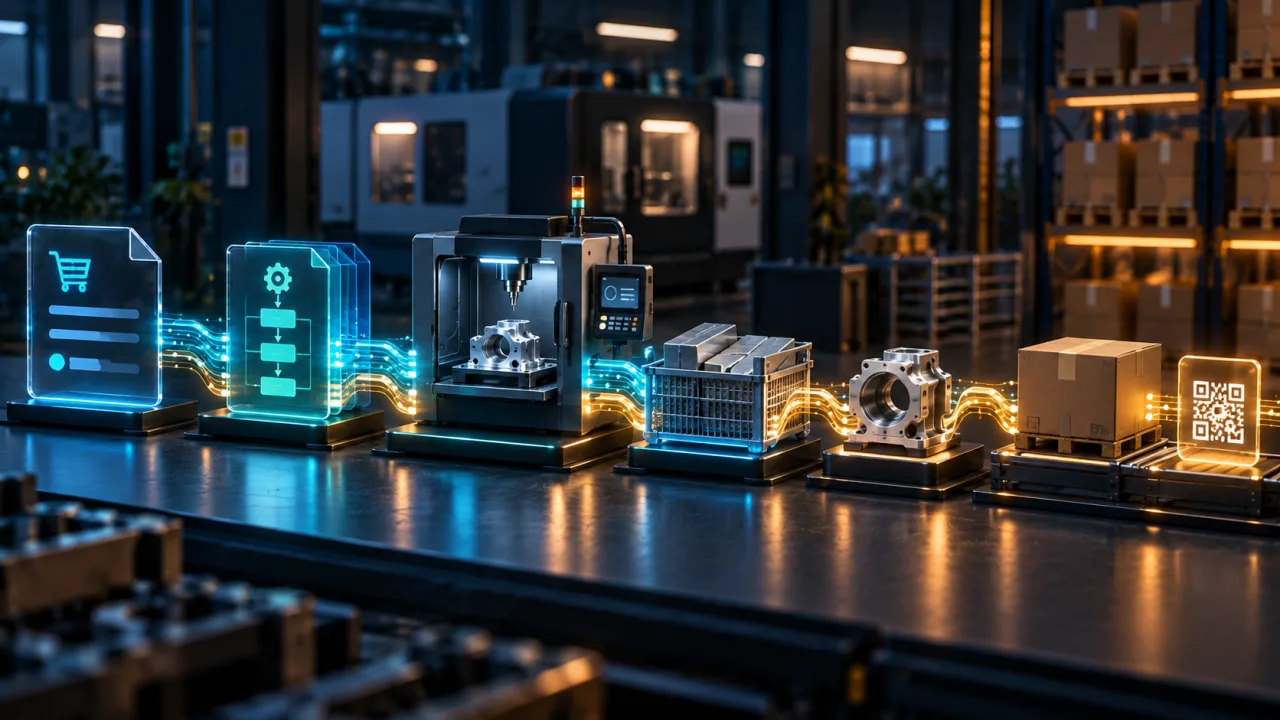
You do not need to replace every application at once. We first identify where information stops forming a coherent process and what smallest stage can deliver a useful result.
The right direction may be adapting MojaProdukcja, adding a module to an existing application, integrating the systems already in use or developing a separate solution in stages.
When does manufacturing stop being one clear process?
A company may have reliable sales, warehouse and accounting applications and still need phone calls or spreadsheets to establish what is happening with an order. The problem is often not a lack of data. It is the absence of one consistent history across several places.
It is worth reviewing an additional system, module or integration when:
- the office, shop floor and warehouse use different information about the same order;
- the current status of a production order has to be established by phone, messages or a spreadsheet;
- an operator is unsure which version of a process plan should be followed;
- the same data is re-entered in several applications;
- material consumption and completed work do not form one readable history;
- it is difficult to determine which batch was used for a product or where a specific batch went;
- the current ERP must remain in use but lacks a specific manufacturing module;
- the company wants to improve one process without replacing its entire software environment.
New software only makes sense when it solves a specific problem. If adjusting the current process, report or import is enough, there is no reason to build a large new system.
From an order to execution and batch history
A sample flow may look like this:
- Receive the order. Data is entered or imported from an agreed source.
- Select the product and process version. The system records the version required for this production run.
- Create a production order. The order contains the information needed for the agreed scope of work.
- Record shop-floor work. Authorised users register starts, pauses, completion and important exceptions.
- Record materials and finished goods. Material consumption and receipt of the product connect production with inventory.
- Use batches, serial numbers and labels. Where the process requires it, identifiers and scans help preserve the history of the flow.
- Review progress. Authorised users can see the status and inspect recorded events.
Traceability here means being able to establish which material batch was used for a product and where that product later went. Its actual scope depends on data, identifiers, devices, staff responsibilities and process configuration.
Not every company needs every element in this example. We define the flow from real work rather than from a fixed module list.
Four possible delivery paths
Adapt MojaProdukcja
This path is worth considering when the need matches areas already available in the product and the company can use its workflow as a starting point. A specific implementation still requires agreed data, roles, devices, security rules and a pilot scope.
Add a module to the existing system
If the current application should remain, adding the missing part of the manufacturing process may be the better option. Before making changes, we review the code, data, deployment method and whether the system can be extended safely.
Integrate the applications already in use
If individual applications do their jobs but employees move data between them manually, an integration may help. The API, available files, licences, identifiers and error handling must be confirmed first.
Develop a separate system in stages
A custom application may be appropriate when the process is specific, includes important exceptions or does not fit available tools. We then begin with a limited scope instead of pretending that the first stage will cover the entire factory.
We do not select a direction based on a product label alone. The choice depends on the process, current applications, data quality, risk and budget.
What do we need to establish before work begins?
You do not need a technical specification. A clear description of the actual work and safe examples without confidential data are enough for the first conversation.
We establish:
- what starts the process and what confirms its completion;
- who takes part and what each role is responsible for;
- what information is required at each step;
- which applications, spreadsheets, files and devices are currently used;
- which systems must remain;
- where data is copied or corrected manually;
- which exceptions, blocks, reversals and corrections occur most often;
- which information requires restricted access;
- how we will jointly confirm that the first stage works.
Do not send passwords, API keys, full database copies, employee data or confidential process documentation through the form. A description and anonymised examples are sufficient at this stage.
Start with one process
The first stage does not need to cover all manufacturing operations. It is often safer to choose one type of production order, a few workstations and a limited user group.
The stage may include:
- a clear start and end of the process;
- the required roles and permissions;
- a minimum data set;
- one agreed method of exchanging data;
- the most important exceptions;
- the event history needed to review progress;
- specific acceptance scenarios.
An acceptance criterion might be the correct creation of a production order from a confirmed sales order, registration of work at selected stations and recording of agreed material movements without re-entering the same data.
For a complex process, the first paid stage may be business analysis and definition of an application MVP. We include the analysis cost in the total project cost if the customer commissions us to deliver the implementation. Scope and pricing are agreed individually.
MojaProdukcja as a point of reference
MojaProdukcja is our separate product that demonstrates how data needed in a selected manufacturing process can be connected. Its current scope includes orders, versioned processes and operations, production orders, work registration, basic inventory movements, data import, batches, labels and scanning.
The product also records successive events and controls user access through roles. It can therefore be a starting point for discussing product adaptation or an example of how a manufacturing system can be designed.
MojaProdukcja is not presented as a complete solution for every company or as a confirmed customer implementation. Its separate website describes the detailed scope, limitations and direction of development.
Integration with the applications that already work
A new module should not duplicate functions of an ERP, warehouse, sales or accounting system without a good reason. We first identify which application owns each type of data and how the required information can be exchanged safely.
Possible exchange methods include:
- a documented API;
- controlled file import or export;
- an agreed CSV, XLSX or XML format;
- secure exchange through a designated directory or server;
- a module built directly into an existing application.
The method can only be confirmed after reviewing documentation, licences, sample data and technical access. We also need to decide what should happen when data is incomplete, duplicated, invalid or temporarily unavailable.
See our system integration and API service.
What is confirmed and what needs a separate scope?
| Area | Status based on current evidence |
|---|---|
| Orders, products, workstations, process plans and production orders | Confirmed MojaProdukcja scope. |
| Recording work, blocks, corrections and rework | Confirmed MojaProdukcja scope. |
| Materials, warehouses, reservations and basic goods receipts, issues and adjustments | Confirmed MojaProdukcja scope. |
| CSV and XLSX order import with preview and validation | Confirmed MojaProdukcja scope. |
| Batches, optional serial numbers, labels, scans and flow history | Confirmed MojaProdukcja scope that requires configuration for the specific process. |
| Multi-level BOMs, recipes and MRP | Require separate analysis and are not presented as ready. |
| Quality control, quarantine and CAPA | Require separate analysis and are not presented as ready. |
| Capacity planning, scheduling, Gantt charts and plan variants | Require separate analysis and are not presented as ready. |
| KPIs, OEE and extended management reporting | Require agreed data, definitions and a separate scope. |
| ERP, e-commerce and machine integrations | Every integration must be reviewed separately. |
If you need a separate management view, see management dashboards and BI reporting.
A safe change instead of a risky switch
Manufacturing software affects daily operations, so the implementation method matters as much as the feature list. For each stage we agree:
- what must be backed up and how the backup will be checked;
- where the change can be tested;
- user roles and access to data;
- test data and acceptance scenarios;
- the required history of important events and changes;
- the launch and rollback plan;
- responsibility for errors and support after launch.
We do not promise a safe migration before reviewing the existing application and its data. When a change concerns a live system, its condition and constraints must be assessed first.
How do we begin working together?
- Choose one process. We define its start, end and participants.
- Review current tools. We establish which applications, data and devices must remain.
- Describe information and exceptions. We identify what is transferred, corrected or blocked.
- Choose the direction. We compare MojaProdukcja, a module, an integration and a separate system.
- Define the first stage. We record features, roles, data, risks and acceptance criteria.
- Build and verify the scope. We test agreed scenarios without expanding the stage during delivery.
- Decide on further development. Additional modules follow only after the earlier stage has been evaluated.
When is a new system unnecessary?
A separate application may be unnecessary when the problem can be solved by:
- improving the configuration of an existing application;
- a simple import or export;
- one missing module;
- an automated report;
- clearer data ownership and responsibilities;
- a process change that does not require new software.
The best result of the first analysis is not always a large development project. Sometimes a smaller integration or a focused correction to the current solution is the right decision.
Frequently asked questions
Do we need to replace our ERP or warehouse system?
No. We first establish which applications should remain and what is genuinely missing. An additional module or integration may be enough.
Can we begin with one process or department?
Yes. A limited pilot is often safer than covering the whole company in the first stage. It still needs a clear start, end and acceptance criteria.
How is MojaProdukcja different from a custom-built system?
MojaProdukcja is an existing product with a confirmed feature scope. A custom solution is considered when the process cannot reasonably be handled by adapting the product, adding a module or creating an integration.
Can the solution connect to our ERP, warehouse or sales system?
We can assess that possibility. It requires API or file documentation, sample data, licensing rules and agreed error handling. We do not promise integration with every application before this review.
Can it handle batches, serial numbers, labels and scanning?
MojaProdukcja includes this scope, but it must be configured for the specific process, identifiers and devices. Responsibility for assigning identifiers and performing scans must also be agreed.
Are BOM, MRP, capacity planning, quality and OEE available?
We do not present these areas as ready. Each requires separate analysis of the process, data and method of verification.
Do we need to prepare a technical specification?
No. A simple description of the current work, applications, participants, data and common exceptions is enough to begin.
How do we verify the first stage before further development?
We define specific acceptance scenarios before work begins and test them with agreed data and roles. The result then supports the decision about the next stage.
What determines cost and delivery time?
The process scope, data condition, number of roles, integrations, devices, security requirements and deployment method. We therefore price and schedule the work individually after reviewing these elements.
What should you send before the first conversation?
Prepare a short description of:
- the process you want to organise;
- its starting point and expected result;
- the people or roles involved;
- current applications, files and devices;
- places where data is re-entered manually;
- common errors, exceptions and delays;
- one scenario that the first stage should handle.
Do not send passwords, access keys, full databases, personal data or confidential process documentation through the form.
Let us discuss the first step
Describe one process that currently requires re-entering data, checking status by phone or working in several disconnected places. We will assess whether MojaProdukcja, an additional module, an integration or a separate system developed in stages is the more sensible direction.
Describe your manufacturing process.
Related services and tools
Describe your project
We build software systems, modules and integrations for manufacturing companies. We help connect a selected process from the order and process plan to execution, inventory and batch traceability.